Series & USPs
To create a Series or a USP, open the sheet basic_inspirationals_xx (replace xx with your language code, e.g., en) and enrich your inspirational(s) with content.
Each row represents one unique series or USP. You can add multiple series/USPs in this sheet.
After creating your Series and/or USPs, connect your articles to their respective inspirational entities. You will find the relevant columns in the basic_product_template for Series and USPs.
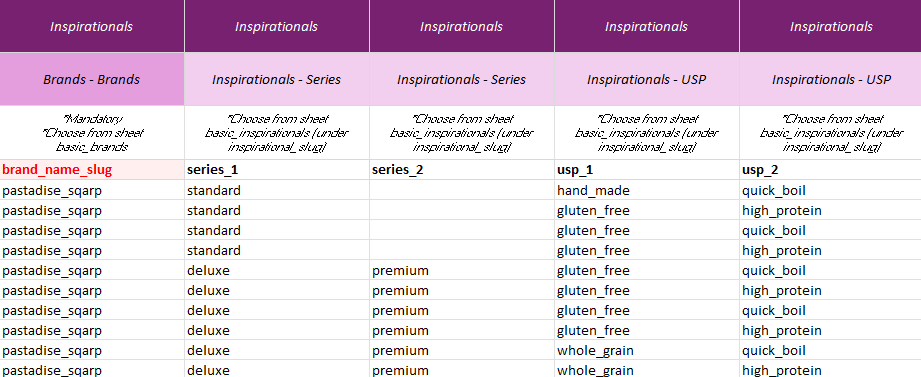
Create a slug for each inspirational entity.
A slug must be lowercase, contain no special characters, and use underscores (_) instead of spaces.
Data & Definitions — basic_inspirationals_xx
| Data | Definition | Rules & validation |
|---|---|---|
| inspirational_slug | Unique identifier for the brand entity | Mandatory. Alphanumerical plus -, _. Each inspirational slug must be unique within the brand. |
| inspirational_name | Public name of the inspirational entity | Mandatory. Free text. |
| inspirational_type | Type of inspirational | Mandatory. Allowed values: series or usp (lowercase). |
| brand_name_slug | Unique identifier for the brand entity connected to the inspirational entity | Mandatory. Alphanumerical plus -, _. Each brand slug must be unique within the organization. |
| description_header_[number] | Header for one description block | Cannot contain HTML, line breaks, or other formatting. |
| description_[number] | Body text for one description block | Cannot contain HTML, line breaks, or other formatting. |
| description_bullets_[number] | Bullet points (pipe-separated) for one description block | Cannot contain HTML, line breaks, or other formatting. Use | as the separator between bullet points. |
| image_url_[number] | URL to one image file | Must be a valid image URL. Validated for HTTP 200 response. |
| document_url_[number] | URL to one document file | Must be a valid document URL. Validated for HTTP 200 response. |
| document_type_[number] | Type of document | Must be a valid document type. Choose from reference sheet Document Types. |
| document_language_codes_[number] | Language(s) of the document | Specify lowercased ISO 639-1 codes. Full list in reference sheet Languages. Separate multiple languages with |. |
| video_url_[number] | URL to one externally hosted video | Must be a valid video URL (preferably YouTube or Vimeo). Validated for HTTP 200 response. |
| video_type_[number] | Type of video | Must be a valid video type. Choose from reference sheet Video Types. |
| video_language_codes_[number] | Spoken language(s) of the video | Specify lowercased ISO 639-1 codes. Full list in reference sheet Languages. Separate multiple languages with |. |
[number]= To create more description blocks, images, documents, and videos, create new columns with incremented suffixes (e.g.,_1,_2,_3, …).
Adding More Content Blocks
To add more content blocks to your brand, create new columns in the template.
In the example below, the yellow-marked columns have been created for additional description blocks.
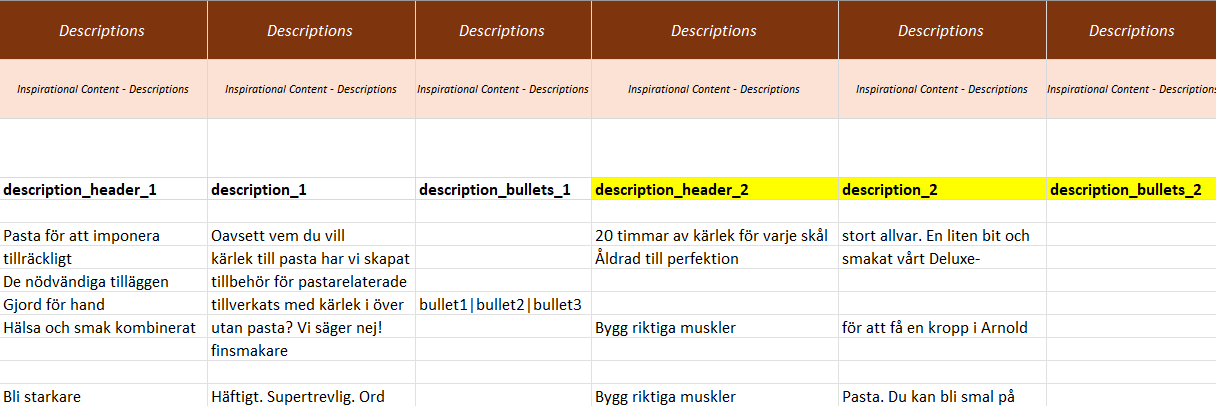
Important: When duplicating description content, all three columns must be added together:
description_header_[number]description_[number]description_bullets_[number]
The same rule applies to documents and videos (i.e., duplicate the full set of related columns with the incremented [number]).