Descriptions
Each description block consists of:
- A header
- A description
- Bullets
Each block must have content in either the description or bullets column — but can also have data in all columns.
A product can have:
- No description blocks
- One description block
- Several description blocks
Adding Multiple Description Blocks
To add several description blocks for the same product:
- Create additional columns in the data template.
- Remember: the order of description blocks in the template is the same as in the SQARP platform.
- For each new block, create three columns:
description_header_[number]description_[number]description_bullets_[number]
- Identify the product using its article number.
- Fill in the header, description, and/or bullets for that block.
Data & Definitions
| Data | Definition | Rules & Validation |
|---|---|---|
description_header_[number] | Header for one description block | Cannot contain HTML, line breaks, or other text formatting. |
description_[number] | Body of one description block | Cannot contain HTML, line breaks, or other text formatting. |
description_bullets_[number] | Bullet points for one description block (pipe-separated) | Cannot contain HTML, line breaks, or other text formatting. Use | as the separator between bullet points. |
[number]= To create more description blocks, create new columns for each block.
Example
To add more description blocks to your articles, create new columns in the template.
In the example below, the yellow-marked columns have been created for additional description blocks.
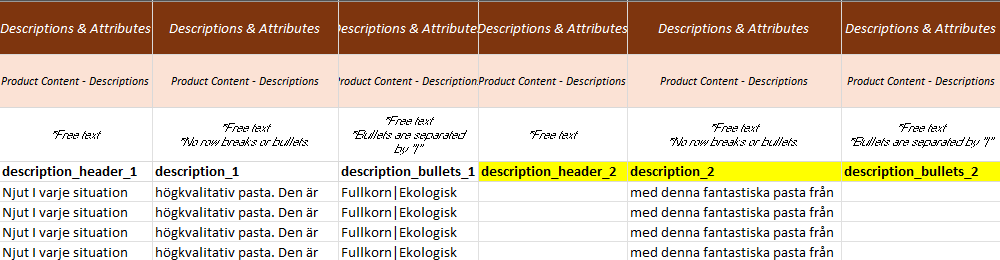
Note: All three columns must be duplicated together:
description_header_[number]description_[number]description_bullets_[number]